How do I record in ultra-high quality (lossless)?
Generally, recorded video is usually compressed, which can cause some color loss compared to the original screen.
If you want to record in lossless mode, you can use the Lagarith Lossless Video external codec.
You can download it from the following address.
http://lags.leetcode.net/codec.html
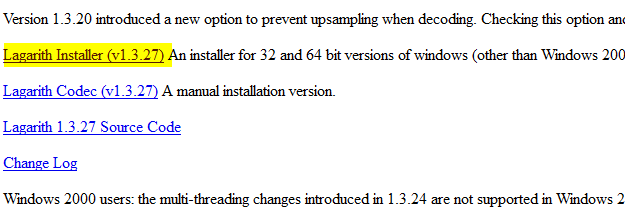
After downloading, install it as shown below.
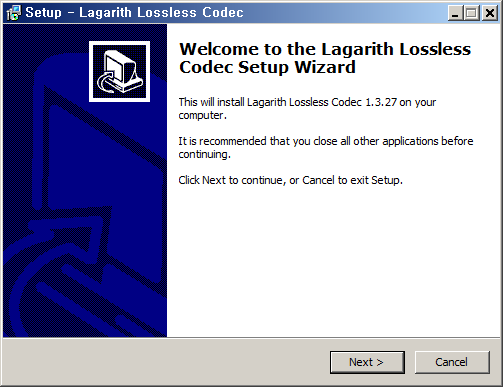
If oCam is already running, restart it. Then in the oCam main window, click Codec - External Codec, check the Use External Codec box,
and select Lagarith Lossless Video from the list.
After selecting it, click Settings. The settings window opens as shown below. Usually you can leave it as is, but you can adjust it according to your environment.
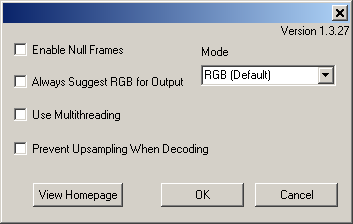
Note that this codec produces visually lossless video, but the resulting files are very large and decoding takes a long time, which may cause playback stuttering.
Therefore, this codec is generally better suited for editing purposes.
Today's News/Tips
How to Buy Apple Products Cheaply (Latest Tips)
Apple products (iPhone, MacBook, iPad, Apple Watch, etc.) are known for being expensive, but if you use discount programs, promotions, and used-device options, you can buy them at about 5~20% off in many cases.
Here are practical ways to do it.
If you’re a student, prioritize education discounts first.
The best option is to use Apple’s official education store, which students, new university students, and school staff can use right away.
(Apple official site)
https://www.apple.com/us-edu/store
The next option is to buy through Costco and get reward points at the same time.
There are other methods too. See the details below.

- Use the education discount store (student/teacher discount, up to 15% off)
If you’re a university student, graduate student, teacher, or school staff member, you can buy Mac and iPad with a discount at the official Apple education store. For example, a MacBook Air with a regular price of about $929 can be around $776, about a 10~15% discount.
How to do it: Go to the Apple education store → upload student ID or enrollment certificate → purchase. Parent-purchase on behalf of the student is also possible.
Tip: Bundle discounts for Apple Pencil or keyboards may also apply.
- Apple Trade In (trade-in used devices for about $67~$334 in credit)
If you return an existing Apple device (iPhone, iPad, etc.), you can receive credit toward a new purchase.
Example: iPhone 14 can get about $201 in credit.
How to do it: Enter your device details on the Trade In page → check the quote → submit online or in-store. Credit can be applied immediately or received as a gift card.
Tip: Credit is usually higher when the battery condition is good. Trading in an older model right after a new iPhone launch is often more favorable.
- Buy from the Refurbished Store (15~20% off, Apple-certified pre-owned)
These are refurbished by Apple from returned/repaired units, are close to new in condition, and include a 1-year warranty. The latest models may not always be available, but previous generations are usually cheaper.
How to do it: Check the Apple Refurbished Store. Example: MacBook Pro M2 at about a 20% discount from the regular price.
- Use online shopping promotions (Costco, etc., 5~10% card discounts)
Buy iPhone, AirPods, and other products during sales on Coupang and similar platforms. Waiting 1~2 months after launch often allows opportunistic coupon stacking for extra savings.
Costco: Apple event promotions can offer about 5% off, and with Hyundai Card you can earn 3% points on purchases of $334 or more.
How to do it: Search “Apple sale” in Coupang → join Rocket WOW membership ($3.34/month) for free shipping and discounts.
Black Friday (November) are strong timing opportunities. You can also check real-time sale alerts on X.
- International shopping (Amazon, Japan Apple Store, usually 10~20% cheaper)
If exchange rates are favorable, buying in the U.S. or Japan can help. Apple stores in Japan may be cheaper due to tax refund options.
How to do it: Check unlock status and buy unlocked devices on Amazon/eBay. Be sure to account for shipping and customs tax (13%)—imports under $67 may be exempt.
Tip: A day-trip “airfare + shopping” strategy can also work, especially when the yen is weak.