How to Find Animated GIFs: Try Using GIPHY.

GIF [Graphics Interchange Format]
One of the compression storage methods used to speed up image transfer,
Compared to JPEG files, it supports fewer colors and has a lower compression ratio, but it offers faster transfer speeds.
'Graphics Interchange Format'
is what GIF stands for, and it was developed to compress graphics for faster transmission over the internet.
When browsing websites, you often come across many animated GIF images.
Huh? Where do people get those?
Where do they even download them?
Where did they get them from?
You’ve probably wondered that, right?
You can search here and use them.
Today's News/Tips
The system stutters during recording.
If your system becomes slow during recording or the mouse movement stutters, this is likely related to high system resource usage.
In particular, when trying to record high resolution or high frame rates with oCam, this issue can occur if your PC specifications cannot handle the workload.
To solve this, you can reduce system load by adjusting several settings.
First, after running the oCam program, click the Settings button on the main window.
When the Settings window opens, go to the Encoding tab at the top and check the related options.
In this area, you can adjust the Frames Per Second (FPS) setting. If the default is set to 30, try lowering it gradually.
For example, reduce the FPS step by step to 25, 20, 15, and 10, and check whether stuttering decreases.
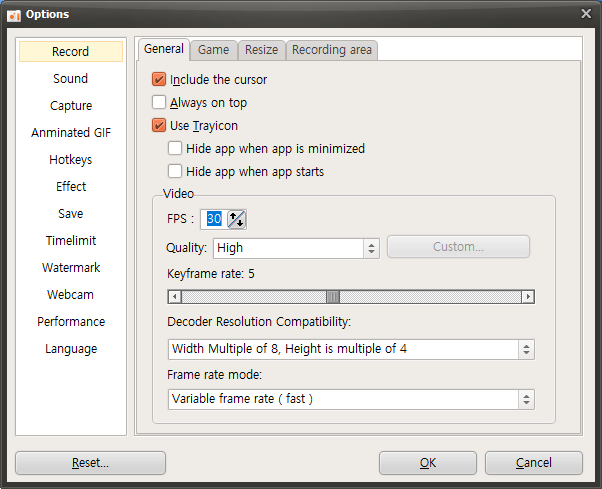
It is important to find an FPS value that is optimal for your PC specifications through this process.
Additionally, lowering the recording resolution or closing unnecessary background programs can also help reduce system load.
We recommend making these adjustments to balance system performance and recording quality.