Using an external codec - Using Xvid
Using an external codec - using Xvid
Go to the official Xvid website.
In the top right menu, click Xvid Video - Download. (Do not select Xvid Codec.)
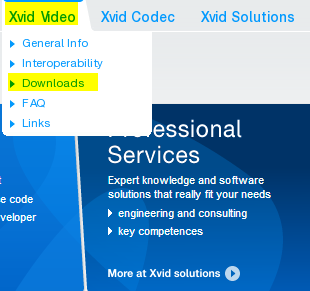
Click the Download button to download it.
This is the installation screen. Just click OK.
As with the details, you can just click the Next button and proceed.
If oCam is already running, restart oCam, then click the Codec button on oCam’s main window and click the External Codec menu.
After that, check the Use External Codec checkbox and you will see the newly added Xvid MPEG-4 Codec.
Select that codec.
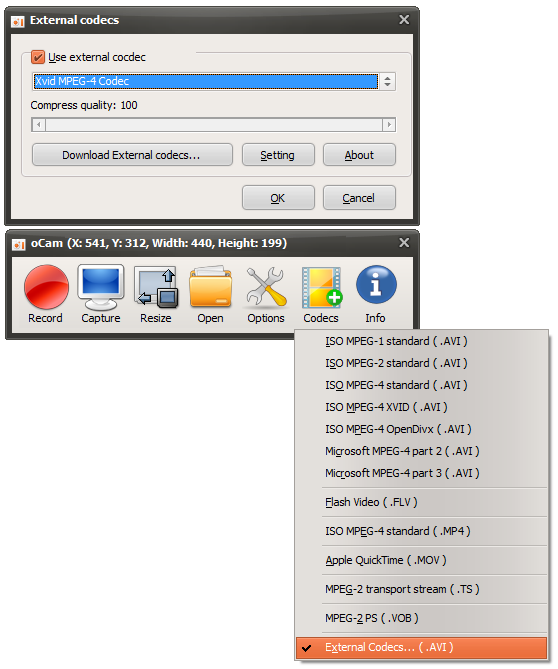
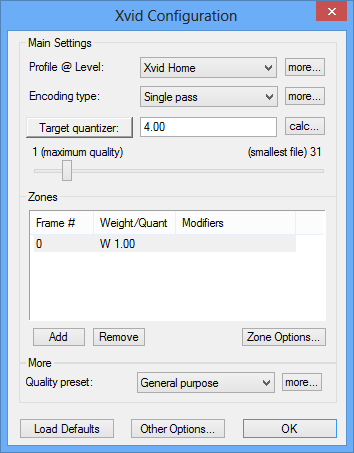
If you click the Settings button, you can set detailed options for the Xvid codec.
Today's News/Tips
What to Do If Minecraft Crashes as Soon as You Start Recording with oCam (NVIDIA Graphics Card)
In Java-based applications that use CUDA, including oCam, problems may occur when certain NVIDIA drivers are installed. In particular, if NVIDIA driver version 378.49 (or some other versions) is installed, a bug may occur where the app crashes with the error "Stack cookie instrumentation code detected a stack-based buffer overrun" when calling the CUDA initialization function `cuInit`.
This issue is not a bug in oCam itself, but a problem with the NVIDIA driver that affects all applications that use CUDA. Therefore, the same error may occur not only in oCam but also in other CUDA-based Java applications.
To resolve this issue, you need to update the NVIDIA driver to the latest version, 378.66 or later. Follow the steps below to update the driver:
1. Go to the official NVIDIA website (geforce.com/drivers).
2. Select your graphics card model and operating system, then search for the latest driver (version 378.66 or later).
3. Run the downloaded driver installer and proceed with the installation.
4. After the installation is complete, restart your computer and run oCam or another CUDA-based application to check whether the issue has been resolved.
Updating the driver to version 378.66 or later will resolve the CUDA initialization crash issue and allow you to use oCam and other related applications normally. If the problem continues even after installing the latest driver, contact NVIDIA Support or check for the latest version of oCam.