Overview of CapturePlus Image Effect Features
This feature lets you adjust image brightness, mosaic effects, size, and more.
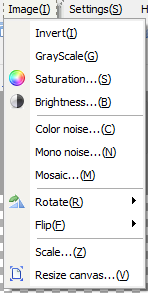
-Invert Colors: Applies an overall color inversion effect to the image.
-Black and White Effect: Applies a black-and-white effect to the image.
-Adjust Saturation: Lets you adjust the saturation level.
-Adjust Brightness: Lets you adjust the brightness.
-Add Noise (Color): Creates a color noise effect.
-Add Noise (Mono): Mono creates a white noise effect.
-Add Mosaic: Applies a mosaic effect to the entire image.
-Rotate: Lets you rotate the image to 90, 180, 270 degrees, or a custom angle.
-Flip: Flips the image left/right or up/down.
-Zoom In and Out: Lets you enlarge or reduce the image, and you can keep the aspect ratio when changing the width or height.
-Resize Canvas: Lets you change the canvas size and background color.